2024. 5. 28. 14:36ㆍAI & Data Science/Deep Learning
*자율주행 기술에 사용된ㄴ 교통 표지판의 내용을 분류하는 프로젝트*
데이터 출처 : https://www.kaggle.com/datasets/meowmeowmeowmeowmeow/gtsrb-german-traffic-sign
GTSRB - German Traffic Sign Recognition Benchmark
Multi-class, single-image classification challenge
www.kaggle.com
(Meta와 Meta.csv는 사용하지 않음)
!pip install -U numpy==1.23.5
!pip install -U seaborn==0.11.2
!pip install -U tensorflow==2.10.0

import os
import random

# Tensorflow 관련 디버그 및 경고 메시지 비활성화
os.environ["TF_CPP_MIN_LOG_LEVEL"] = "2"

import tensorflow as tf
import numpy as np
import pandas as pd
import matplotlib.pyplot as plt
import seaborn as sns
from PIL import Image, ImageDraw
from tqdm import tqdm

root_dir = '/mnt/data'

train_metadata = pd.read_csv(os.path.join(root_dir, 'Train.csv'))
test_metadata = pd.read_csv(os.path.join(root_dir, 'Test.csv'))

train_metadata.head()

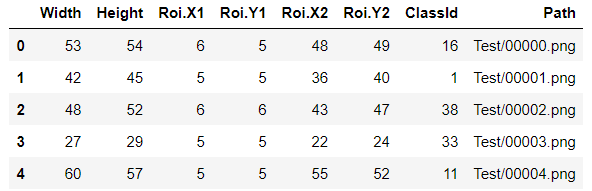
- `Width`: 이미지 파일의 너비
- `Height`: 이미지 파일의 높이
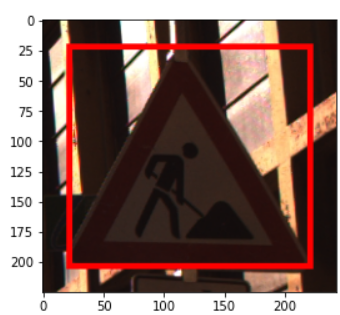
- `Roi.X1`: 이미지 파일 내에서 실제 표지판이 존재하는 곳을 상자로 감쌌을 때 좌상단 X좌표
- `Roi.Y1`: 이미지 파일 내에서 실제 표지판이 존재하는 곳을 상자로 감쌌을 때 좌상단 Y좌표
- `Roi.X2`: 이미지 파일 내에서 실제 표지판이 존재하는 곳을 상자로 감쌌을 때 우하단 X좌표
- `Roi.Y2`: 이미지 파일 내에서 실제 표지판이 존재하는 곳을 상자로 감쌌을 때 우하단 Y좌표
( RoI는 Region of Interest라는 뜻)
- `ClassId`: 해당 이미지의 클래스 ID (0 ~ 42까지 존재)
- `Path`: 실제 이미지가 저장된 경로
x = 'Path'와 y = 'ClassId'
1) 두 파일 모두 같은 컬럼을 가지고 있음.
2) 크기가 모두 제각각 -> 딥러닝 모델에 적용하기 위해서는 모두 같은 크기의 이미지를 가져야 하기 때문에 하나의 값으로 통일이 필요.
- 데이터 출력
sample_metadata = train_metadata.iloc[28589, :]
sample_img = Image.open(os.path.join(root_dir, sample_metadata['Path']))

roi_box = ImageDraw.Draw(sample_img)
roi_box.rectangle(
    (
        sample_metadata['Roi.X1'], # 좌상단 X 좌표
        sample_metadata['Roi.Y1'], # 좌상단 Y 좌표
        sample_metadata['Roi.X2'], # 우하단 X 좌표
        sample_metadata['Roi.Y2'], # 우하단 Y 좌표
    ),
    outline=(255, 0, 0), # Bounding Box 색을 빨간색으로
    width=5 # Bounding Box 선의 두께
)

plt.imshow(sample_img)
1. 데이터 분석 및 시각화
- 학습 데이터의 이미지 너비(Width)와 높이(Height)의 분포를 살펴보기.
fig, ax = plt.subplots(2, 1, figsize=(12, 8))
sns.set_palette('tab10')
sns.histplot(train_metadata, x='Width', kde=True, stat='percent', label='Width', ax=ax[0], color='r')
ax[0].legend()
sns.histplot(train_metadata, x='Height', kde=True, stat='percent', label='Height', ax=ax[1], color='b')
ax[1].legend()
대부분의 이미지 파일의 너비와 높이는 50 이하인 것으로 확인됨.
CIFAR-10 데이터를 따라 32x32로 통일.
또한, train 디렉토리가 class id별로 나누어져 있기 때문에 ImageDataGenerator를 통해 데이터셋을 생성.
img_height, img_width = 32, 32

# 정규화
train_gen = tf.keras.preprocessing.image.ImageDataGenerator(rescale=1./255,
validation_split=0.2)

# flow_from_directory를 통해 데이터셋을 생성
# 클래스 ID별로 저장된 디렉토리 경로명 지정
train_set = train_gen.flow_from_directory(
    os.path.join(root_dir, 'Train'),
    target_size=(img_height, img_width),
    class_mode='categorical',
    batch_size=256,
    shuffle=True,
    seed=SEED,
    subset='training'
)

valid_set = train_gen.flow_from_directory(
    os.path.join(root_dir, 'Train'),
    target_size=(img_height, img_width),
    class_mode='categorical',
    batch_size=256,
    shuffle=False,
    subset='validation'
)
반면, test 데이터는 하나로 통일되어 있음.
test_metadata = pd.read_csv(os.path.join(root_dir, 'Test.csv'))

# flow_from_dataframe 메소드는 클래스 ID에 해당하는 컬럼의 데이터 타입이 문자열(str)이여야 함.
test_metadata['ClassId'] = test_metadata['ClassId'].astype(str)

test_gen = tf.keras.preprocessing.image.ImageDataGenerator(rescale=1./255)

test_set = test_gen.flow_from_dataframe(
    test_metadata,
    directory=root_dir,
    x_col='Path',
    y_col='ClassId',
    target_size=(img_height, img_width),
    class_mode='categorical',
    batch_size=256,
    shuffle=False
)
- flow_from_directory에서는 DataFrame의 어떤 컬럼이 입력(X)이고 어떤 컬럼이 라벨(y)인지 지정이 필요.
- 각 이미지 파일의 경로는 'directory' argument의 값과 x_col에 지정한 컬럼의 각 값을 join해서 얻어지기 때문에 'Path' 컬럼이 'Test/00000.png'와 같이 이루어져 있으므로 'directory'에는 데이터셋의 최상위 경로만 지정.
2. CNN 모델 정의 및 학습
model = tf.keras.Sequential([
    tf.keras.layers.Conv2D(32, kernel_size=3, padding='same',
    activation='relu',input_shape=(img_height, img_width, 3)),

    # 뒤에 등장하는 Dense layer에 적용하기 위해 3차원 데이터를 1차원으로 바꿔주는 Layer
    tf.keras.layers.Flatten(),

    # 43개 클래스를 구분해야 하므로 43개의 노드를 가지는 Dense layer를 추가
    tf.keras.layers.Dense(43, activation='softmax')])
optimizer = tf.keras.optimizers.Adam(learning_rate=1e-3)
model.compile(
optimizer=optimizer,
loss='categorical_crossentropy',
metrics=['accuracy'])
num_epochs = 5
history = model.fit(train_set, epochs=num_epochs, validation_data=valid_set)
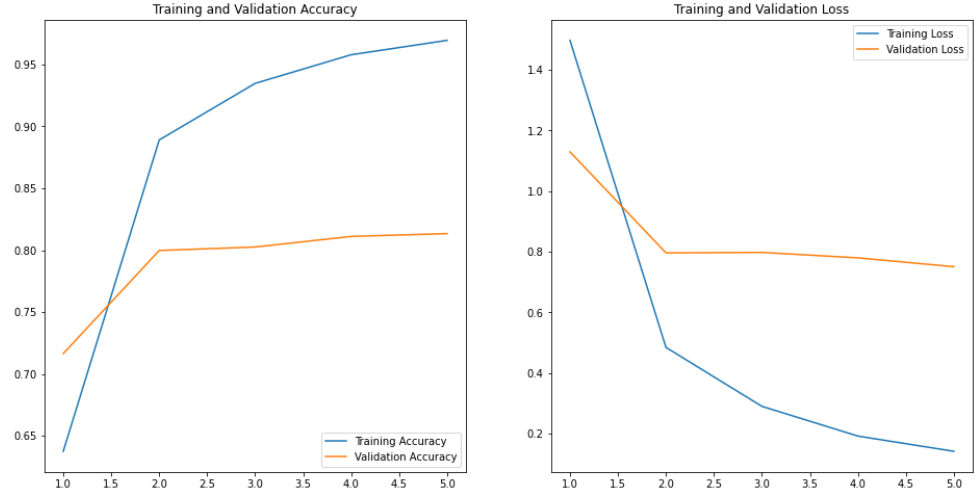
- 성능 확인
accuracy = history.history['accuracy']
val_accuracy = history.history['val_accuracy']

loss = history.history['loss']
val_loss = history.history['val_loss']

epochs_range = range(1, num_epochs + 1)

plt.figure(figsize=(16, 8))
plt.subplot(1, 2, 1)
plt.plot(epochs_range, accuracy, label='Training Accuracy')
plt.plot(epochs_range, val_accuracy, label='Validation Accuracy')
plt.legend(loc='lower right')
plt.title('Training and Validation Accuracy')

plt.subplot(1, 2, 2)
plt.plot(epochs_range, loss, label='Training Loss')
plt.plot(epochs_range, val_loss, label='Validation Loss')
plt.legend(loc='upper right')
plt.title('Training and Validation Loss')
plt.show()
_, test_accuracy = model.evaluate(test_set)
테스트 정확도 : 83.785%
- 실제 라벨과 예측 라벨 일치 여부 확인
num_sample = 25

test_pred = np.argmax(model.predict(test_set), axis=-1)[:num_sample]
X_test_sample = test_set[0][0][:num_sample, :, :]
y_test_sample = np.argmax(test_set[0][1][:num_sample, :], axis=-1)

plt.figure(figsize=(13, 13))
for i in range(num_sample):
    plt.subplot(5, 5, i + 1)
    plt.grid(False)
    plt.xticks([])
    plt.yticks([])

    prediction = test_pred[i]
    actual = y_test_sample[i]
    color = 'g'
    if prediction != actual:
        color = 'r'

    plt.xlabel(f'Actual={actual} || Pred={prediction}', color=color)
    plt.imshow(tf.keras.utils.array_to_img(X_test_sample[i]))

plt.show()
'AI & Data Science > Deep Learning' 카테고리의 다른 글
| GPR(지표투과레이더) 데이터를 이용한 매설물 탐지 모델 개발 (0) | 2024.05.28 |
|---|---|
| 딥러닝 최적화(Optimization) (0) | 2024.05.21 |
| [Tensorflow] 딥러닝 모델 구현하기 (0) | 2024.05.20 |
| [Tesorflow] 텐서 데이터 생성 (0) | 2024.05.20 |