2024. 5. 28. 13:37ㆍAI & Data Science/Deep Learning
지하탐지 분야에서 주목받고 있는 GPR(Ground Pentrating Rader) 데이터를
CNN (Convolution Neural Network)을 이용하여 배관 등의 매설 위치를 파악하기.
데이터 출처 : https://github.com/rpl-cmu/CMU-GPR-Dataset
GitHub - rpl-cmu/CMU-GPR-Dataset: Dataset and utilities for research on localizing ground penetrating radar (GPR).
Dataset and utilities for research on localizing ground penetrating radar (GPR). - rpl-cmu/CMU-GPR-Dataset
github.com
CMU GPR dataset은 GPR 센서의 측정 결과와 측정 위치를 레이블링한 데이터이다. 본 데이터는 GPR을 측정한 정확한 위치가 함께 레이블링 되어 있으나 그 속에 무었이 있는지에 대한 정보를 가지고 있지는 않다.
1. 데이터 분석 및 시각화
GPR은 전자파를 지면에 방출 시켜서 되돌아 오는 반사파를 기록한다. 만일 지하에 무엇인가 매질이 다른 물질이 있으면 되돌아오는 반사파의 형태가 변하게 된다. 때문에 되돌아오는 반사파의 형태를 분석하면 지하에 무엇이 매설되어 있는지를 추측할 수 있다.

gpr_meas.csv 파일에는 GPR에서 측정한 200개의 반사된 주파수의 시간별 amplitude(진폭)가 저장되어 있다.

Amp_0 와 Amp_3 컬럼을 비교해 보면 평균(mean)/분산(std)이 각각 8.29/82.105, -107.94,/60.57로 주파수에 따른 통계적 특성이 제각각 다름을 알 수 있다.
- Amp_0, Amp_10, Amp_100 컬럼의 시간에 따른 값 변화
df[['Amp_0','Amp_10', 'Amp_100']].plot(grid='on')

Amp_10 컬럼의 주파수의 amplitude의 변화를 보면 779, 848 등의 위치에서 그 신호가 급격하게 떨어짐.
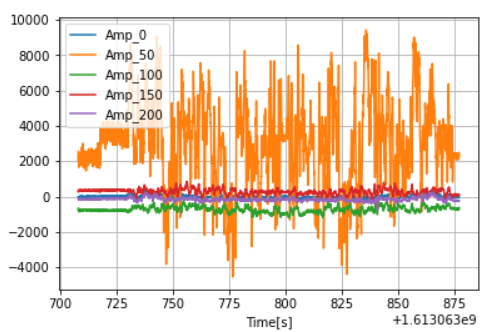
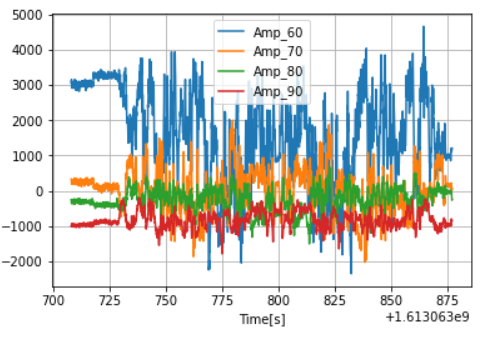
추가적으로 시각화를 해봤을 때, Amp_50에서 60이 변화가 심하였다.
- 데이터를 이미지 형태로 변환
Amp_0 부터 Amp_200까지의 column을 모으면 2D matrix 형태이기 때문에 이미지형태로 변환할 수 있다.
전체 200개의 주파수에 대한 데이터를 최대/최소값을 지정하여 normalization(정규화)한 이미지를 표시
# df.values는 df의 전체 column을 matrix 형태로 변환.
# Y축 방향이 시간이 되기 때문에  transpose 하여 보기 편하도록 matrix의 모양을 변경.
image_like_data = df.values.T

#최대/최소값을 지정하여 그 사이의 값이 0과 1사이가 되도록 min-max normalization을 수행합니다.
(vmax, vmin) = (2500, -1000)
norm_img = (image_like_data - vmin)/(vmax-vmin)

# min-mix normalization만을 수행하면 최대/최소값을 넘어가는 데이터 존재.
# visulization이 잘 되지 않기에 값 조절.
clipped_img = np.clip(0,1, norm_img)

# GPR sensor 데이터를 이미지 형태로 변환한 결과를 출력.
plt.figure(figsize=(32, 4))
plt.imshow(clipped_img, cmap='gray', vmax=1, vmin=0.0)
plt.axvline(x=1615) # 설명을 위한 표시 추가
plt.tight_layout()
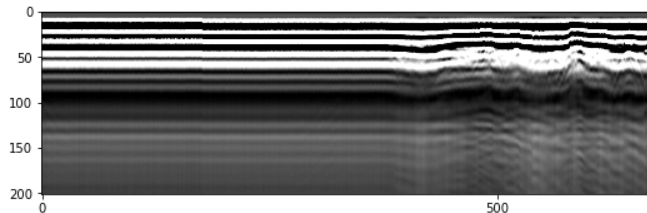
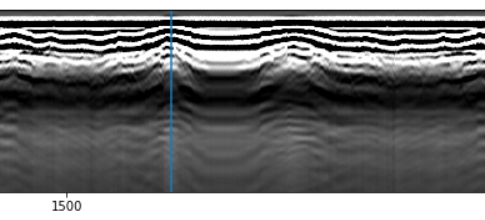
1615근처의 위치뿐만 아니라 다른 곳곳에서 파형이 돌출되는 현상을 볼 수 있다.
해당 위치에는 지하에 무었인가 밀도가 다른 물질이 있다고 볼 수 있다.
2. 2차함수의 파형이 없는 이미지(normal) 200장과 파형이 있는 이미지(abnormnal) 200장으로 CNN 모델을 이용해 영상 분류 (classification)

image_size = (201, 200)
batch_size = 8
seed = 9721
- 과적합 방지를 위해 augmentation 수행
# augmentation pipeline
data_augmentation = keras.Sequential([layers.RandomFlip(mode='horizontal'),])
- CNN 모델 설계(간단한 Xception network를 사용)
def make_model(input_shape, num_classes):
    inputs = keras.Input(shape=input_shape)

    # 이미지 augmentation 설정.
    x = data_augmentation(inputs)

    # 초기 레이어 설정하는 코드.
    x = layers.Rescaling(1.0 / 255)(x)
    x = layers.Conv2D(32, 3, strides=2, padding="same")(x)
    x = layers.BatchNormalization()(x)
    x = layers.Activation("relu")(x)

    x = layers.Conv2D(64, 3, padding="same")(x)
    x = layers.BatchNormalization()(x)
    x = layers.Activation("relu")(x)

    previous_block_activation = x  # Set aside residual

    for size in [8, 16, 32, 48]:
        x = layers.Activation("relu")(x)
        x = layers.SeparableConv2D(size, 3, padding="same")(x)
        x = layers.BatchNormalization()(x)

        x = layers.Activation("relu")(x)
        x = layers.SeparableConv2D(size, 3, padding="same")(x)
        x = layers.BatchNormalization()(x)

        x = layers.MaxPooling2D(3, strides=2, padding="same")(x)

        # Project residual
        residual = layers.Conv2D(size, 1, strides=2, padding="same")(
            previous_block_activation
        )
        x = layers.add([x, residual])  # Add back residual.
        previous_block_activation = x  # Set aside next residual

    x = layers.SeparableConv2D(128, 3, padding="same")(x)
    x = layers.BatchNormalization()(x)
    x = layers.Activation("relu")(x)

    x = layers.GlobalAveragePooling2D()(x)

    if num_classes == 2:
        activation = "sigmoid"
        units = 1
    else:
        activation = "softmax"
        units = num_classes

    x = layers.Dropout(0.5)(x)
    outputs = layers.Dense(units, activation=activation)(x)

    return keras.Model(inputs, outputs)

model = make_model(input_shape=image_size + (3,), num_classes=2)
설계한 모델 확인하기
keras.utils.plot_model(model, show_shapes=True)
- 모델 학습.
epochs = 30

# callback 함수를 정의
callbacks = [
    # 가장 결과가 좋은 Model을 best.h5로 저장합니다.
    keras.callbacks.ModelCheckpoint("./models/best.h5", save_best_only=True, monitor='val_loss'),

    # 학습하는 과정에서 결과의 개선이 없으면 learning rate를 조절하는 callback 함수]
    keras.callbacks.ReduceLROnPlateau(monitor='val_loss', factor=0.1,
    patience=10, verbose=0, mode='auto', min_delta=0.0001, cooldown=0, min_lr=0),
]

model.compile(
    optimizer=keras.optimizers.Adam(1e-3),
    loss="binary_crossentropy",
    metrics=["accuracy"],
)

model.fit(
    train_ds,
    epochs=epochs,
    callbacks=callbacks,
    validation_data=val_ds,
)
- 모델 추론
# 가장 학습 결과가 좋은 모델을 로딩
model = tf.keras.models.load_model("./models/best.h5")

# 테스트를 위해 정상 이미지 1장와 abnormal 이미지 1장을 로딩
normal_img = keras.preprocessing.image.load_img(
    "./data/labeled/normal/1613059433_516002_X_2.3793_Y_-35.1849_T_odom_20.8377_dir_-1.0_0.png", target_size=image_size
)

abnormal_img = keras.preprocessing.image.load_img(
"./data/labeled/abnormal/1613059614_8893247_X_12.9562_Y_-44.8245_T_odom_35.5064_dir_-1.0_0.png", target_size=image_size
)

# 이미지를 입력하면 predict를 수행하고 그 결과를 표시하는 함수
def predict_and_show(img):
    img_array = keras.preprocessing.image.img_to_array(img)
    img_array = tf.expand_dims(img_array, 0)  # Create batch axis

    predictions = model.predict(img_array)
    score = predictions[0]
    # print(score)
    print( "This image is %.2f percent abnormal and %.2f normal." % (100 * (1 - score), 100 * score))

    plt.figure()
    plt.imshow(img, cmap='gray')

# normal 이미지를 입력하여 결과
predict_and_show(normal_img)

# abnormal 이미지를 입력하여 결과
predict_and_show(abnormal_img)
normal 이미지는 99.89%, abnormal 이미지는 96.67%로 추론된다.
3. ResNet 모델을 이용한 추론
from tensorflow import Tensor
from tensorflow.keras.layers import Input, Conv2D, ReLU, BatchNormalization, AveragePooling2D, Flatten, Dense
from tensorflow.keras.models import Model

def relu_bn(inputs: Tensor) -> Tensor:
    relu = ReLU()(inputs)
    bn = BatchNormalization()(relu)
    return bn

def residual_block(x: Tensor, downsample: bool, filters: int, kernel_size: int = 3) -> Tensor:
    y = Conv2D(kernel_size=kernel_size,
               strides= (1 if not downsample else 2),
               filters=filters,
               padding="same")(x)
    y = relu_bn(y)
    y = Conv2D(kernel_size=kernel_size,
               strides=1,
               filters=filters,
               padding="same")(y)

    if downsample:
        x = Conv2D(kernel_size=1,
                   strides=2,
                   filters=filters,
                   padding="same")(x)
    out = layers.add([x, y])
    out = relu_bn(out)
    return out

def make_resnet(input_shape, num_classes):
    num_filters = 4
    inputs = keras.Input(shape=input_shape)
    # Image augmentation block
    x = data_augmentation(inputs)

    # Entry block
    x = layers.Rescaling(1.0 / 255)(x)

    x = BatchNormalization()(x)
    x = Conv2D(kernel_size=3,
               strides=1,
               filters=num_filters,
               padding="same")(x)
    x = relu_bn(x)

    num_blocks_list = [2, 5, 5, 2]
    for i in range(len(num_blocks_list)):
        num_blocks = num_blocks_list[i]
        for j in range(num_blocks):
            x = residual_block(x, downsample=(j==0 and i!=0), filters=num_filters)
        num_filters *= 2

    x = layers.GlobalAveragePooling2D()(x)
    if num_classes == 2:
        activation = "sigmoid"
        units = 1
    else:
        activation = "softmax"
        units = num_classes

    x = layers.Dropout(0.5)(x)
    outputs = layers.Dense(units, activation=activation)(x)
    return keras.Model(inputs, outputs)

resnet_model = make_resnet(input_shape=image_size + (3,), num_classes=2)
epochs = 20
callbacks = [
    keras.callbacks.ModelCheckpoint("./models/resnet_best.h5", save_best_only=True, monitor='val_loss'),
    keras.callbacks.ReduceLROnPlateau(monitor='val_loss', factor=0.1, patience=5, verbose=0, mode='auto', min_delta=0.00001, cooldown=0, min_lr=0),
]

resnet_model.compile(
    optimizer=keras.optimizers.Adam(1e-3),
    loss="binary_crossentropy",
    metrics=["accuracy"],
)

resnet_model.fit(
    train_ds,
    epochs=epochs,
    callbacks=callbacks,
    validation_data=val_ds,
)
resnet_model = tf.keras.models.load_model("./models/resnet_best.h5")
normal_img = keras.preprocessing.image.load_img(
    "./data/labeled/normal/1613059433_516002_X_2.3793_Y_-35.1849_T_odom_20.8377_dir_-1.0_0.png", target_size=image_size
)
abnormal_img = keras.preprocessing.image.load_img(
"./data/labeled/abnormal/1613059614_8893247_X_12.9562_Y_-44.8245_T_odom_35.5064_dir_-1.0_0.png", target_size=image_size
)


def predict_and_show(img):
    img_array = keras.preprocessing.image.img_to_array(img)
    img_array = tf.expand_dims(img_array, 0)  # Create batch axis
    predictions = resnet_model.predict(img_array)
    score = predictions[0]
    print( "This image is %.2f percent abnormal and %.2f normal." % (100 * (1 - score), 100 * score))
    plt.figure()
    plt.imshow(img, cmap='gray')

predict_and_show(normal_img)
predict_and_show(abnormal_img)
ResNet의 경우 normal은 70.72%, abnormal은 98.55%로 추론.
'AI & Data Science > Deep Learning' 카테고리의 다른 글
| 교통 표지판 이미지 분류 (1) | 2024.05.28 |
|---|---|
| 딥러닝 최적화(Optimization) (0) | 2024.05.21 |
| [Tensorflow] 딥러닝 모델 구현하기 (0) | 2024.05.20 |
| [Tesorflow] 텐서 데이터 생성 (0) | 2024.05.20 |